Milestone 4: making the frame fast

Twenty seconds into the opening, at 57 frames a second on my M3 Max.
Where Milestone 3 left the frame
Milestone 3 finished the pipeline. Every frame now goes from moving fireflies to a finished image:

The top row is the light, traced at a quarter of the output’s pixels. ReSTIR PT traces a few light paths for each pixel. Manifold next event estimation (MNEE) finds the light that the glass marbles focus onto the table. Each pixel then borrows good paths from its own previous frame and from its neighbors. What comes out is still noisy.
The bottom row is the image. The renderer records what each pixel shows: its surface color, orientation, depth and motion. The network I trained in Milestone 3 uses those to decide how much each noisy neighbor should count, removes the noise, and fills in the full resolution. A tone map turns the light into display colors.
That frame looked mostly right. It ran at about 43 frames a second at 1920 × 1080, and about 13 at the full size of my laptop’s display.
What this milestone set out to do
Once a renderer produces the right image, the next work looks much the same in most engines. They keep what the pipeline computes, and change how much of it is computed each frame and how well the GPU is kept busy while doing it.
This milestone applied four of those standard optimizations to the Milestone 3 pipeline and kept three. Then a closer look at the marbles sent me back over every stage of the frame, comparing each with how shipped engines build it, and that added four more changes. Finally, I retrained the network for the input that had changed. Here is the same frame, with each change marked where it acts:

Running the light and the image at the same time
A GPU has different kinds of hardware: units that test rays against the scene, units that do arithmetic, and memory. Most passes lean on one of them and leave the others waiting. Engines, consoles above all, put independent work on a second queue so it can run in those gaps. This is usually called async compute.
Serenity’s frame splits that way. Tracing the light keeps the ray-tracing hardware busy, and the network is almost entirely arithmetic. So the network now works on one frame while the light of the next is traced:

Each frame’s data is kept separate, so neither half overwrites what the other is still reading. The image is unchanged. The price is a little more latency.
It helped, but much less than the GPU’s counters suggested, because the two halves slowed each other down. My reading, not yet confirmed, is that the arithmetic units looked idle without being free. Each core’s threads, registers and on-chip memory are one pool, and the ray-tracing work holds its share of that pool while it waits for the ray-tracing unit.
The same question comes up in inference whenever two kernels are overlapped to fill each other’s gaps. A utilization counter shows what is idle, not what is available.
Shadow rays that skip what cannot cast a shadow
Engines tag geometry by kind and let each ray skip the kinds it does not care about. Particles, foliage and small effects are commonly left out of shadow rays, which only need to know whether anything blocks the light.
In Serenity, 616 of the scene’s 653 objects are fireflies a millimeter or two across. A firefly’s own shadow is almost never visible, yet every shadow ray still had to search among all of them. Now shadow rays search only the 37 surfaces, the table and the marbles:

Metal’s version of this feature works on a scene layout Serenity doesn’t use, and adopting that layout made every ray slower. So I built a second ray-tracing structure holding only the surfaces, once at start-up, since none of them moves. The image changes only where a firefly resting on the table used to shade the wood beside it.
The usual companion is splitting the scene into a still part and a moving part, so only what moves is rebuilt each frame. Here rebuilding the fireflies was already nearly free, and the layout that split needs is the one that slowed every ray on Metal, so I skipped it. It comes back with the Vulkan and Xbox backends, where that layout is the hardware’s normal case.
Tracing half the pixels each frame
Checkerboard rendering traces half the pixels each frame, alternating like the squares of a checkerboard, and rebuilds the other half from the frame before. Consoles used it to reach 4K, and NVIDIA’s RTXDI has a checkerboard mode for ray-traced lighting. I read RTXDI’s source and followed it.
The light is the expensive half of Serenity’s frame, so the light is traced in a checkerboard:

A new fill stage rebuilds each untraced pixel. It takes the light the previous frame traced where the pixel’s motion says its surface was, if the depth there agrees, and otherwise borrows from the traced pixels beside it. The surface features stay complete every frame, because they are what lets the fill tell whether a surface is the same one.
My first attempt reused the whole previous image, filled pixels included, and the untraced half drifted darker frame by frame. Taking only pixels that were actually traced fixed it. The image came out a little smoother and a little softer.
Checking the whole frame against shipped engines
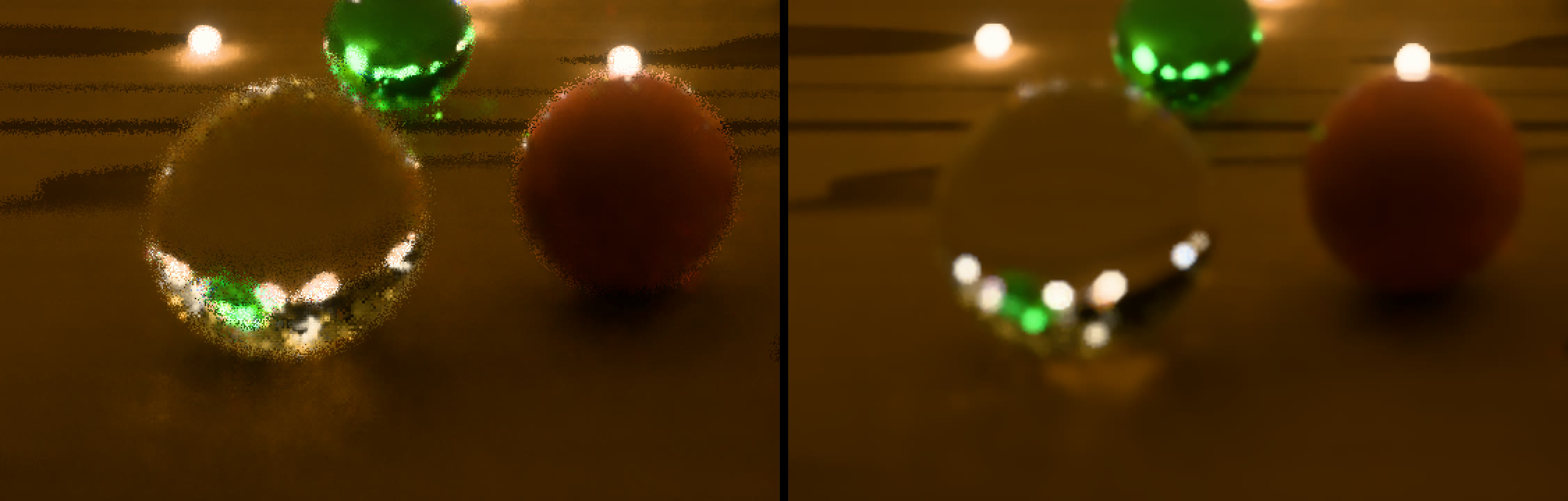
With those three in place, I looked at the marbles up close. The large ones nearest the camera had ragged, speckled outlines, and had since Milestone 3. The marbles further back were clean.
The cause was where the blur came from. Serenity made its depth of field the way an offline renderer does: every pixel’s ray passes through a random point on a lens, every frame. At a blurred edge, a single ray lands on the marble or on the table at random, so the surface information the network relies on flickered between the two from pixel to pixel, and the network kept that speckle as if it were a real edge. The near marbles are the most out of focus, so they suffered most.
Real-time engines don’t blur inside the trace. They trace a sharp image, denoise it, and apply depth of field afterward, using each pixel’s depth. I had checked each optimization against production practice, but never the camera. So I went over every stage of the frame against how Unreal, NVIDIA’s RTXDI and denoisers, and Apple’s own samples do it, and kept four changes:
- Depth of field after the network. The light is traced sharp, and a new stage blurs the finished image by each pixel’s distance from focus, following the method from Call of Duty: Advanced Warfare, at half resolution as shipped games run it.
- A fixed jitter pattern. Upscalers like DLSS shift the camera by a fraction of a pixel each frame along a fixed sequence and tell the network the offset. Serenity’s network upscales, so it now gets the same.
- Brighter lights drawn more often. RTXDI picks which lights to sample in proportion to their power, so noise moves away from dim fireflies that barely matter.
- Frames paced by the display. The window now renders when the display asks for a frame, as Apple recommends, behind a seam that a Vulkan or Xbox backend can implement its own way.
Teaching the network the new input
Checkerboard, the sharp trace and the jitter all change what the network sees, so I retrained it on a new data set. The targets it learns toward come from the path tracer, which now renders them sharp too, so this time everything had to be rendered again:

That was also where I found a mistake of my own. A first retrain I believed was on checkerboard input wasn’t: the graph that renders the training inputs traced every pixel, because only the demo itself switched checkerboard on. Training data has to be exactly what the network sees at run time. So the input graph now traces the way the demo does, and a test checks that the two match, bit for bit, before anything is rendered.
This was the first training run on my RTX 3090. Training now runs on either GPU, keeping its data on the card when it fits and in system memory when it doesn’t, as on the 3090. On the held-out marbles the retrained network has 22 to 41% less error than Intel’s Open Image Denoise.
Where it stands
The fully lit scene now runs at 57 frames a second at 1920 × 1080 on my M3 Max, up from 43, and about 17 at my laptop display’s full size, up from 13. Tracing half the pixels gained the most. Depth of field gave a little back, and was worth it: it is what made the near marbles look like glass instead of noise. Running the two halves together gained the least, and taught me the most.
The network and the reuse steps are now the larger costs. The reuse steps merge reservoirs much as attention merges partial softmax results, and so far I have treated them as passes rather than as kernels. Their tiling, data layout and fusion are the questions that brought me to Serenity.
Those answers depend on the hardware, though. Apple’s GPUs, NVIDIA’s and AMD’s each have their own on-chip memory, register budgets and ways of grouping threads, so a kernel tuned for one is not tuned for the others. FlashAttention is the familiar example: the same algorithm, its kernels rewritten for each GPU generation. Tuning the reuse steps on Metal alone would mean doing it again later.
So the next step is for Serenity to leave the Mac. A Vulkan backend will put the same scene on my RTX 3090 and AMD’s Strix Halo, and a Direct3D 12 backend on the Xbox Series X, where the split scene and console async compute come back into play. Then the reuse steps can be tuned as kernels, for each of them.
Milestone 3 beside Milestone 4
The frame rates in the labels were measured on the fully lit scene at 120 seconds, on an M3 Max. This film shows the opening.