Milestone 2: reusing work with ReSTIR
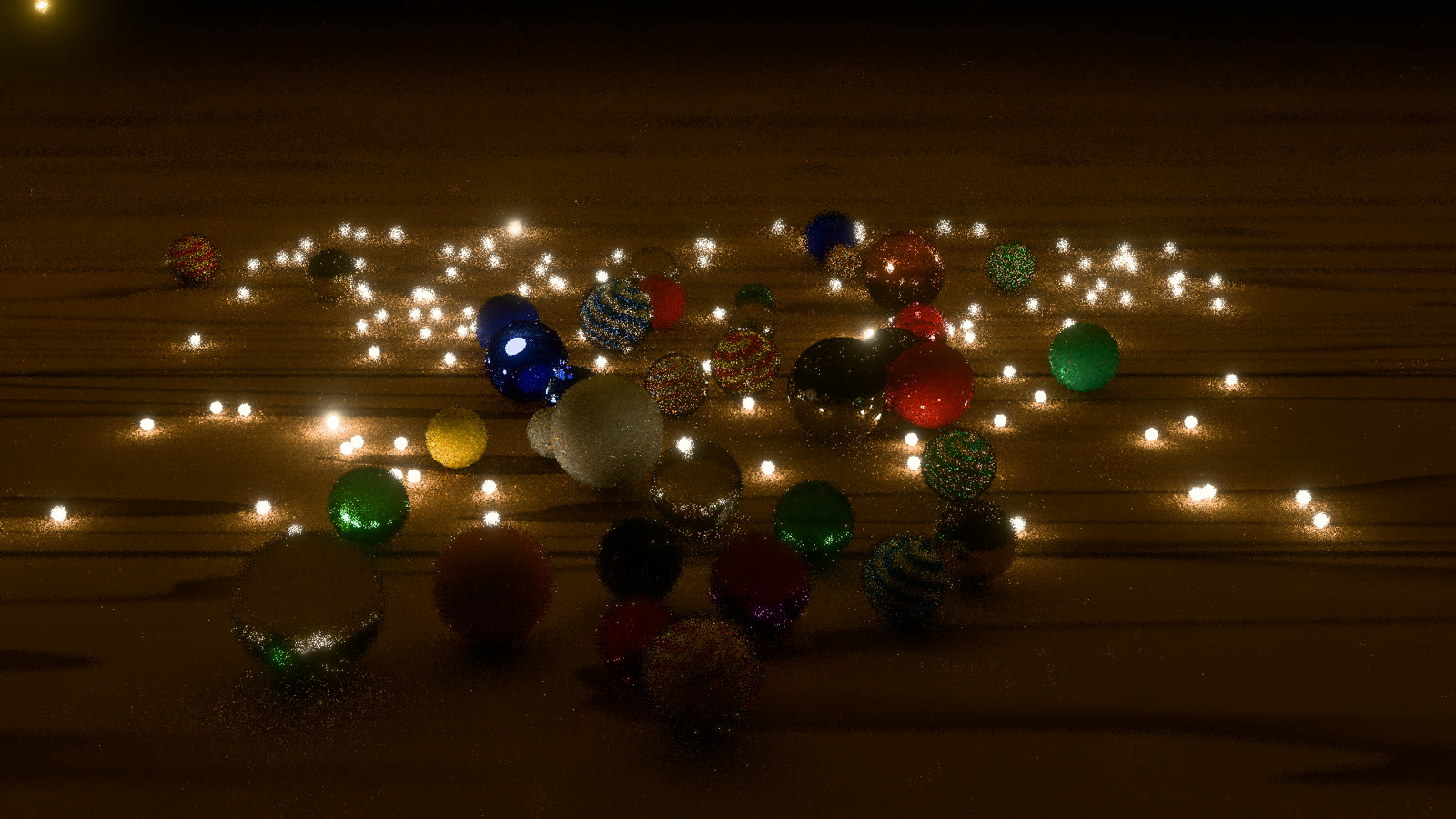
Ten seconds into the opening, rendered with ReSTIR PT and manifold next event estimation at 1920 × 1080.
One of the reasons I built Serenity was to work through GPU problems that also turn up in Charlotte, my browser inference engine. Attention gave me an initial connection: work through candidates in small pieces, keep a compact running result, and combine results without writing every intermediate value to memory. Following that connection through the renderer brings in more of the inference pipeline. There is earlier work to retain, expensive work to schedule, and an intermediate result that needs processing before the next stage can use it well.
Milestone 1 gave me a path tracer that could produce the image I wanted if I let it take enough samples. For a moving scene, that work starts again with every frame. The fireflies move, but the table, marbles, and much of the light’s route through them remain. I wanted to find out how much of that work the next frame could use.
Deciding what to keep
In Charlotte, the KV cache keeps the keys and values already computed for earlier tokens. Generating another token gives attention a new query to work with; retaining those earlier results saves rebuilding them. In Serenity, ReSTIR keeps promising light samples and gives nearby pixels and later frames a chance to use them. Both put a recurring decision in front of me: which results are worth the memory and the cost of reading them again?
ReSTIR makes that decision with a reservoir. It considers a stream of candidates, retaining one sample and a small amount of information about the weights. Reservoirs can also be combined, so a pixel can draw on the work done elsewhere without keeping every candidate that was considered.
The relationship to attention is easiest to see with two values. If attention gives 10 a weight of 25% and 20 a weight of 75%, their weighted average is 17.5. A reservoir given those weights keeps 10 a quarter of the time and 20 three quarters of the time. Averaging repeated draws approaches 17.5. That connects the weighting to the sampling, while the small, mergeable state gives me something concrete to investigate on the GPU.
What goes into that state turned out to matter more than my initial plan allowed for. I began with ReSTIR DI, which reuses direct-light samples. It helped with a firefly lighting the table, but much of this scene’s interest comes from light passing through glass or reflecting off metal. My direct-light reuse left that work largely untouched. At full resolution, DI took about 54 ms against the path tracer’s 30 ms. Letting the path tracer spend the difference on more samples produced the better image.
That sent me to ReSTIR PT, following Lin, Kettunen, and Wyman’s ReSTIR PT Enhanced. Keeping paths let reuse reach through the marbles to the surfaces behind them. I had planned to work through direct and indirect lighting before getting to whole paths; the scene gave me a reason to move there sooner.
Reusing a path still involves work. A path through glass bends differently when it starts at another pixel, so part of it has to be traced again. The first version, sharing paths only between neighboring pixels, spent too much of its time doing that. Keeping paths from the previous frame made reuse more useful with this fixed camera. The moving lights also make the lifetime of those saved results part of the problem: I need the history to help the current frame follow the light, without leaving old lighting behind.
I also found a simpler piece of work worth retaining. Each reuse attempt was tracing the receiving pixel’s camera ray to find its first surface, even though the initial pass had already found it. Saving that surface once removed 22 ms from the spatial reuse pass at 3456 × 2234. This is the part of the cache comparison I can measure directly in Serenity: paying for a stored result can be considerably cheaper than reconstructing it wherever it is needed.
With those changes, the wood grain and the porcelain’s color became easier to see through the noise at a comparable frame cost. The glass and metal benefited much less. Reuse was now earning its place, but I needed to understand what it was leaving behind.
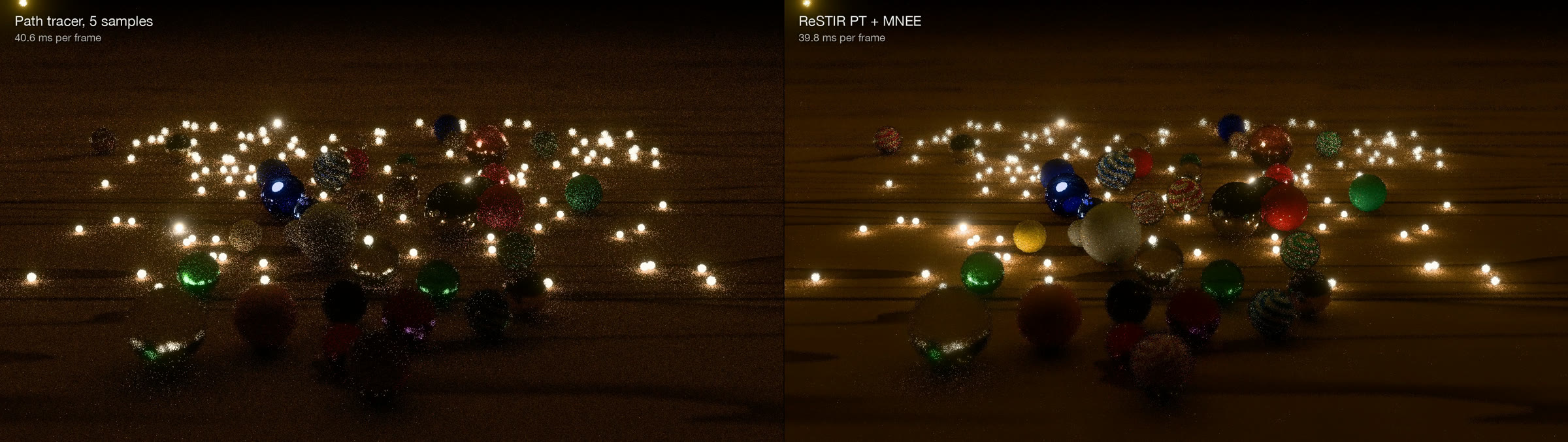
The opening at ten seconds. Five path-traced samples per pixel on the left; ReSTIR PT with the additional glass-lighting work described below on the right. The five-sample budget comes from the measured frame costs.
Giving the glass its own work
A useful path has to be found before it can be reused. Light focused through glass onto the table or a cat’s-eye core is particularly easy for random sampling to miss. I added manifold next event estimation, or MNEE, following the approach used for shadow caustics in Blender Cycles. It searches for a route through the glass to a light, giving the renderer a way to find those connections deliberately.
The first implementation brought the path-traced frame to 124 ms at full resolution. Only about one path in ten needed that search, but the GPU executes threads in groups. Putting the solver inside the ordinary path loop made the other paths in a group wait for it. Collecting the searches into a worklist and running them in a separate pass brought the frame down to about 59 ms.
I run into this scheduling question from the other direction in Charlotte. There, query/key normalization, position encoding, and writing the KV cache share a kernel. Those operations work on the same data in sequence, so combining them avoids intermediate memory traffic and dispatches. Serenity’s glass search is expensive work needed by a minority of paths; giving it a separate pass lets the rest finish. In both projects, the layout of the work determines how much of the GPU I can actually use.
Within ReSTIR PT, the glass search adds about 15% to the fully lit frame’s cost and reduces displayed error in the glass-and-metal region by 16%. I kept it enabled there. In the plain path tracer, spending that time on more ordinary samples worked better, so it remains optional. That decision has to come from the whole frame: finding a better sample helps only if it leaves enough time to produce the rest of the image.
What I get for the frame time
The comparison I care about is what the two renderers can produce in the time available. Milestone 1 used MSE × rendering time to account for both error and cost. Here I give the cheaper renderer more samples until the frame costs are approximately equal, then compare MSE itself. At equal time, multiplying both errors by that time leaves their ratio unchanged.
On my M3 Max at 1920 × 1080, ReSTIR PT with the glass search takes 39.8 ms for the fully lit scene. Five path-traced samples cost an estimated 40.6 ms. The table measures error after tone mapping and bloom, against a 2,048-sample reference processed the same way. Lower MSE is better.
| Region and scene time | Displayed MSE, path tracer | Displayed MSE, ReSTIR PT + MNEE | Path-tracer MSE / ReSTIR MSE |
|---|---|---|---|
| Whole frame, all lights awake | 0.0116 | 0.0060 | 1.9× |
| Porcelain, all lights awake | 0.0163 | 0.0061 | 2.7× |
| Table, all lights awake | 0.0080 | 0.0028 | 2.9× |
| Glass and metal, all lights awake | 0.0405 | 0.0309 | 1.3× |
| Whole frame, dark opening | 0.0124 | 0.0087 | 1.4× |
All lights awake is at 120 seconds; the opening is at eight seconds, where frame costs are 41.4 ms for ReSTIR and 43.6 ms for five path-traced samples. Ratios compare error without a further time adjustment. ReSTIR has 30 previous frames of history with moving lights; these are ongoing frame costs, after that history has been built.
The table and porcelain are where reuse pays most clearly. Across the whole fully lit image, displayed error is roughly halved for a similar frame cost. That is enough improvement to keep working with it.
It also points toward the next problem. Before tone mapping, the fully lit path tracer has about 4.5 times less linear error against the 65,536-sample reference. ReSTIR’s rare, very bright samples dominate that measure; tone mapping compresses them, making the improvement across the other surfaces more visible. Some light is missing too: in a separate glass-sphere test, the MNEE solver leaves about 6.5% too little light in the shadow because it misses paths around the caustic’s rim. The measurement notes keep the full comparisons.
Those results give me two things to work on. The sampling still needs attention around the glass, and the samples I have need to become a stable moving image. A bright outlier that looks tolerable in one displayed frame can be conspicuous when it appears and disappears across several.
Making the samples useful
This is another connection to the inference pipeline that interests me. Attention operates within a sequence of transformations that control the values passed between stages. RMSNorm controls activation scale; QK normalization controls the scale of queries and keys, so their magnitudes do not arbitrarily drive attention toward a few overwhelming scores. That conditioning is part of how the model makes its intermediate results useful to the computation that follows.
In Serenity, the next stage will reconstruct an image from a small number of noisy samples. A denoiser uses the available evidence, including earlier frames, to estimate a stable result. Normalization works on scale and denoising works on sampling variation; both bring me back to the quality of the data moving through the pipeline, alongside the cost of producing it. The renderer gives me a particularly tangible way to investigate that. I can see when a small light disappears, a reflection smears, or a caustic loses its shape.
The current renderer takes around 40 ms at 1920 × 1080 and about 150 ms at 3456 × 2234 with all lights awake. Next I want to put a denoiser behind it and try tracing at a lower resolution with upscaling. Reuse has given me better samples across much of the scene. The next milestone is about turning those samples into a moving image while keeping the fireflies and their reflections intact.
The comparison in motion
The timing labels use the fully lit benchmark. The writeup gives the frame costs for both that scene and the dark opening.